Project Guy
A downloadable tool for Windows
DOWNLOAD
UPDATE 6/16/26 - Notes can be resized and buttons stay in correct position. Timer can be set on note, though using system time is currently broken.
UPDATE 5/23/26 - Painting on screen works a lot better now, and notes have a bit more functionality. Also, some styling options to buttons. Also, you can use it to launch games, as well, why not?!
UPDATE 5/20/26 - Made a little progress on note functionality. Can minimize and resize. More to come.
UPDATE 5/15/26 - Noticed the GPU going wild when I set the guy to disappear. Guessing setting a window size to (0,0) breaks some math, so fixed it by setting it to (1,1) instead.
UPDATE 5/14/26 - bunch of quality of life stuff. Now works with Godot project icons that are saved by local RUID (i.e. modern Godot versions) rather than by file path.
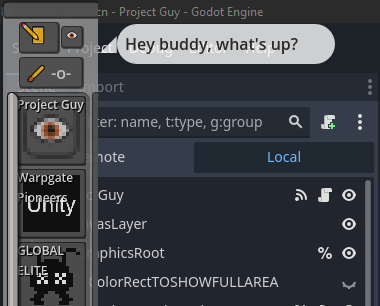
Hey what's up? This here's Project Guy, a customizable, project-focused task bar. It was originally meant as a way to unify Godot versions under a single launcher, or anyway launch projects that use different engine versions without needing to track down the correct version after initial setup. For context, Godot lacks the unified launcher that, say, Unity has with the Unity Hub. While creating it, I realized I could also launch Unity projects from it, as well as probably any other project with a dedicated IDE that can be launched via command line.
TO ADD A NEW PROJECT
Click the button with the plus on it or click options (the gear icon) and click Add Project.
Set the project name (this acts as the key to all project-related data and cannot be changed once set. However, from the Projects page of the options window, you can remove projects and then add them again with the correct name. I'll smooth this out)
Copy-and-paste the filepath or drag-and-drop the project you would like to add into the Project Filepath field. For Godot projects, this can either be the root folder or the project.godot file within the root folder. For Unity projects, you should use the root folder of the project. For Unreal Engine, though, you will need the full path to the actual project file (that's the file ending in .uproject).
Set the Engine. Different engines have different arguments for booting up a project. In the future, I intend to add moddable engine parameters so users can add and customize new engines and engine launch arguments/behaviour.
Copy-and-paste or drag-and-drop the engine executable you would like to use. This should be a file ending in .exe. This should be the precise editor you plan to use for the provided project, so if you're using a custom build of the Godot Engine, you'll want to use the .exe for that custom build.
Click Add Project, and if everything is set up properly, the project should be able to launch from the button for it in Project Guy's belly. If there is something wrong, click on the Projects tab of the options menu and make sure all the filepaths look correct. Note that folders can erroneously end in .exe, so even though the filepath ending makes it look like an executable, it might just be the folder that contains the executable and you may need to edit the filepath accordingly. I hope that makes sense.
At the moment, the launcher only has proper coding for launching Godot, Unity, and Unreal projects. There is some validation for matching engine versions, as well, but more needs to be done to protect against launching in the wrong version. When hovering over project buttons, a tooltip will show filepaths and give a warning if the detected engine version number does not appear somewhere in the engine filepath. It will not block launching of the project, however, which can result in errors and confusion, especially as Godot project files automatically save the version number of the editor version with which they are launched, regardless of whether or not it is correct. If lots of new errors occur when the project starts, it has likely been opened in the wrong version, but reopening with the correct version should resolve things.
If you are working with an "unsupported" engine, but that engine can be launched from the command line by passing in the engine executable filepath followed by the project filepath, you should be able to fill out those fields and disregard any warnings about mismatching engine versions and still use Project Guy as the launcher. Even if fields contain improper looking filepaths (e.g. an engine that doesn't end in .exe), it will still attempt to launch them and tell you if it fails.
There are also several buttons with intended features that are either partially implemented or do not work at all. This is very much a work in progress, and I intend to keep working on it when I have the time or if you ask me to.
So if it's so unfinished, why am I releasing it? Well, I think the basic functionality, that of a unified launcher for Godot and other projects, is useful enough and may be of use to others. I'd also like your feedback on the project so far, so feel free to let me know what you think.
As a final note, this project contains no AI and is not designed to directly mess with the projects you add to it. The biggest risk is accidentally opening a project in the wrong version of the engine, but I am planning to add additional safeguards and QOL features to make this a little less risky.
Download
Install instructions
Download the zip file and unzip (you may need a free program like 7-zip to unzip)
Double click "Project Guy.exe"
Add your projects and get busy
Leave a comment
Log in with itch.io to leave a comment.